
Infinix mobile users wait every year for a new system update because a new update helps the phone work better, faster, and safer. Infinix XOS 16 Update Device List Many users are now searching about XOS 16, which is based on Android 16. They want to know what XOS 16 is, when it will come, what new features it has, and which Infinix phones will receive this update.
Many Infinix users are excited and also confused. They ask one simple question, “Will my phone get XOS 16 or not?” On the internet, many people share wrong and fake information. Because of this, users feel confused. In this article, everything is explained in clear and simple words so you can easily understand which phones may get the update and how it will help your phone.

Infinix Phones which Get XOS 16 (Android 16) update
Important Note (Please Read Carefully):
The phone list given below is prepared using Infinix’s past update history, the phone’s launch year, and its hardware performance such as processor and RAM. This list shows only the expected devices that may receive the XOS 16 (Android 16) update. It is official confirmation from Infinix, and final update availability can change based on region and company policy.
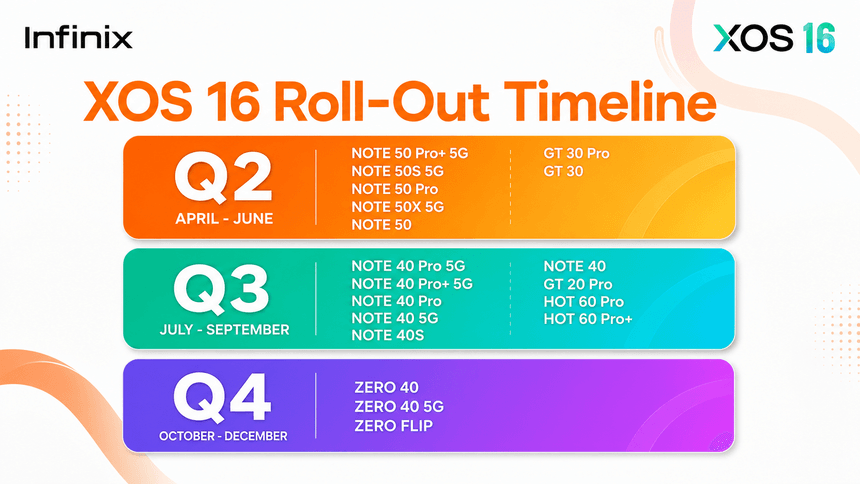
| Rollout Phase | Expected Timeframe | Eligible Models |
|---|---|---|
| Q2 2026 | April to June 2026 | Infinix Note 50 Pro+ 5G, Note 50S 5G, Note 50 Pro, Note 50X 5G, Note 50, GT 30 Pro, GT 30 |
| Q3 2026 | July to September 2026 | Infinix Note 40 Pro 5G, NOTE 40 Pro 5G, NOTE 40 5G, NOTE 40 Pro, Note 40S, Note 40, GT 20 Pro, Hot 60 Pro, Hot 60 Pro+ |
| Q4 2026 (Last wave – currently starting) | October to December 2026 | Zero 40, Zero 40 5G, Zero Flip |
Infinix XOS 16 Note Series Update Timeline
Infinix Note 50 Series
- NOTE 50 Pro+ 5G
- NOTE 50S 5G
- NOTE 50 Pro
- NOTE 50X 5G
- NOTE 50X 5G
Infinix Note 40 Series
- NOTE 40 Pro 5G
- NOTE 40 Pro+ 5G
- NOTE 40 5G
- NOTE 40 Pro
- NOTE 40S
- NOTE 40
Newer Note series phones have strong hardware, so they have a high chance of receiving XOS 16.
Infinix GT Series
- Infinix GT 20 Pro
- Infinix GT 30
- Infinix GT 30 Pro
GT series phones are gaming-focused and have powerful processors, making them suitable for Android 16.
Infinix Hot Series
- HOT 60 Pro
- HOT 60 Pro+
Only newer Hot models may receive the update. Older Hot phones may not.
Infinix Zero Series
- ZERO 40
- ZERO 40 5G
- ZERO FLIP
Zero series phones are premium models and usually receive major updates.
How to Update XOS 16 on Infinix Phone (Step-by-Step)
Follow these steps carefully when the update is available.
Step 1: Open Settings
Open Settings on your Infinix phone.
Step 2: Go to System Update
Scroll down and tap Software Update or System Update.
Step 3: Check for Update
Tap Check for Update.
Your phone will search for XOS 16.
Step 4: Download the Update
If XOS 16 is available:
- Tap Download
- Use Wi-Fi for better speed
Step 5: Install the Update
After download:
- Tap Install
- Phone will restart
- Update will install automatically
Step 6: Wait After Update
After update:
- Phone may feel slow for 1 day
- Battery may drain slightly
This is normal. The system needs time to adjust.
Final Words
XOS 16 (Android 16) is made to make Infinix phones better and smoother, not worse. Not every Infinix phone will get XOS 16, but newer and powerful models have a good chance. Always wait for the official update notification in settings.
If your phone receives XOS 16, update it safely and enjoy a better experience.
